
In open-world games, the player expects interesting variations of the environment. A commonly used technique is to divide the map in ‘biomes’, each of which has its own generation rules and ‘themes’.
Depending on your ambitions, a biome may be little more than a color swap of a common generation algorithm, or it can be a totally different entity with its own noises, style and blocks.
I’m leaning towards the latter.
How to select which biome to use at which location
This is more of an open-ended question than anything. The method with which you define which biome a particular area of the map uses is entirely up to you.
It can be almost random (reminder: it should actually be pseudo-random, and always be the same for the same map – like most things we’ve done up until now, using the world coordinates to generate pseudo-randomness is a straightforward way to go).
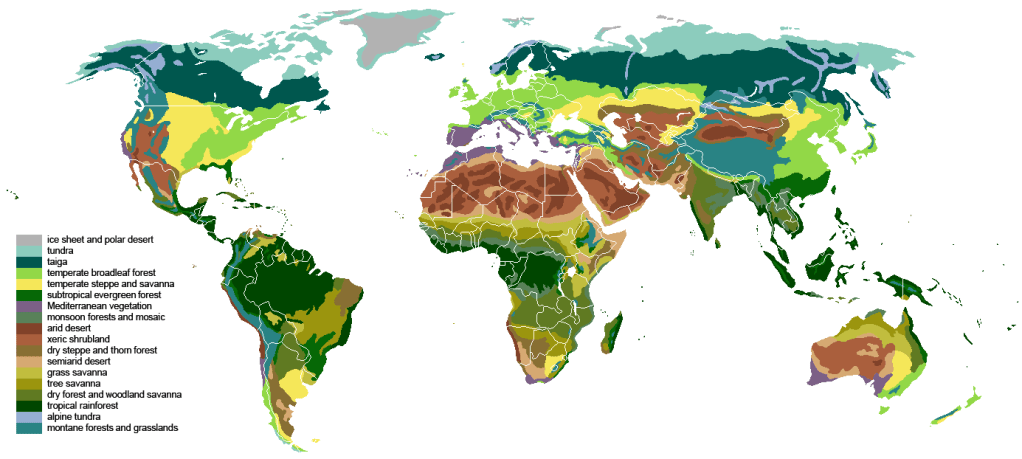
It can also (try to) be realistic. In real life, what we call biomes are just groups based on natural conditions. The advantage of basing your biome selection algorithm on semi-realistic data is that, obviously, your worlds will look more realistic. With the completely random method from above, you may very well end up with a scorching hot desert directly next to snow-covered taiga.
The last sentence should give you a hint for the semi-realistic approach. One popular method is to use the combination of elevation, moisture and temperature to define the biome.
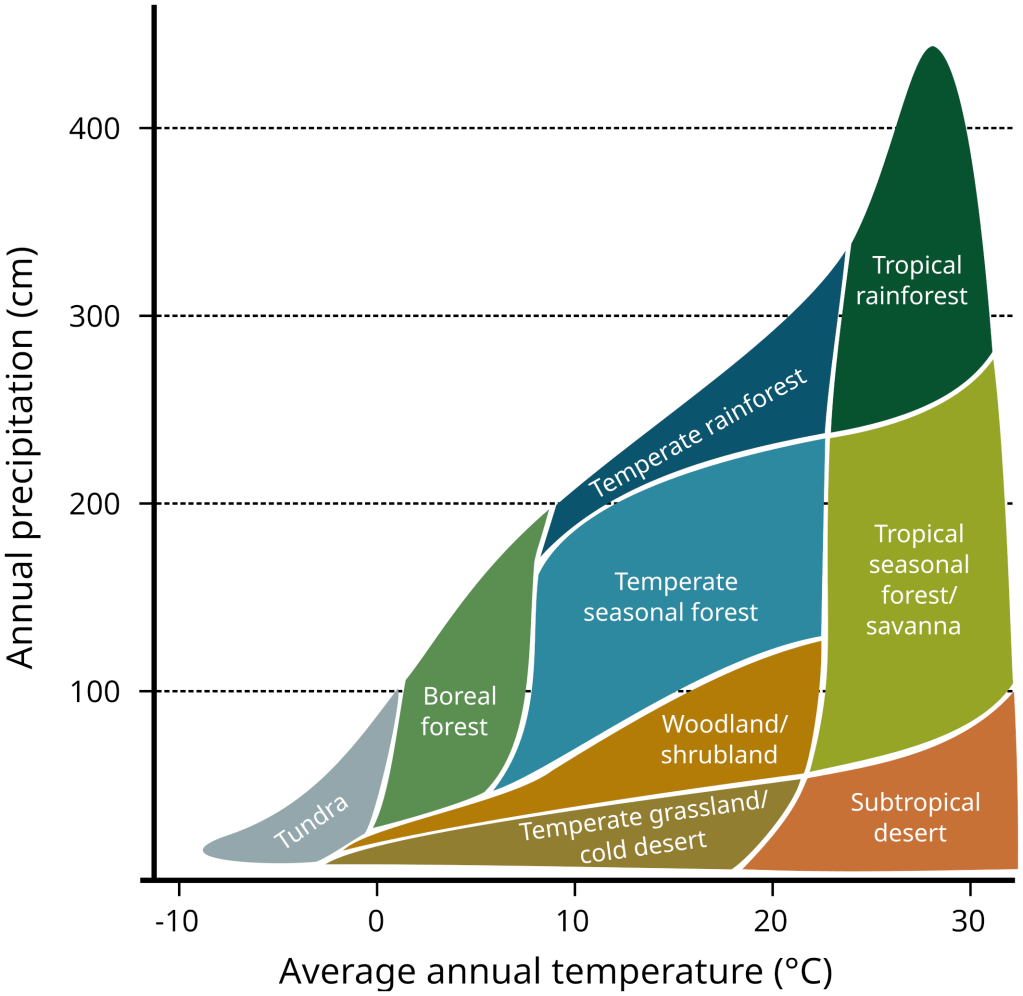
Once you have this information (elevation, moisture, temperature – we’re going to discuss how to generate it just below!), the easiest is to use a lookup table.
In my case, I gather the full list of biomes I’ve configured at the start of the game. These biomes contain their ‘coordinates’ (elevation, moisture, temperature) with which I generate a 3d array (lookup table). Each biome represents a ‘point’ in this array. Next, I simply floodfill from each of these starting points until the array is full of valid biome values.
If you do that, you end up with something similar to the previous picture:
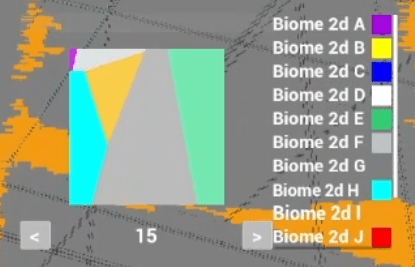
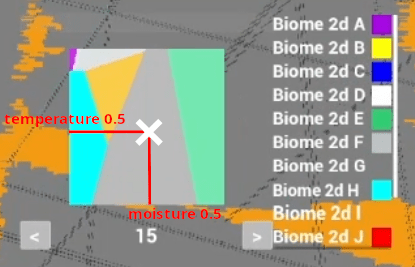
The above is a test example from my project. It doesn’t make any realistic sense, it’s just random biomes with random coordinates producing a lookup table. What we’re seeing is the temperature and moisture distribution. The ’15’ at the bottom is the elevation, and pressing the arrow button on the left and right would update the lookup table above with the new ‘elevation slice’.
Picking a data structure fit for your needs
Now that we know the data we need to select biomes, we might be tempted to generate our noises (elevation, moisture, temperature – or whatever pseudo-random approach you chose) on the block themselves, and then forget about it.
This is a perfectly valid approach, however it can become quite costly, and you lose some precious information about the biome generation. Furthermore, in my case I want to get more out of the biomes than simply block-level data like height or block types. Indeed, I wish for my biomes to be complex entities, potentially having gameplay impacts well after they’ve been generated. By that I mean that I want to be able to keep track of and identify the biome area, I want to be able to give a procedurally generated label to them (for example, imagine the player sees a message like ‘You’ve just entered the forest of XXX’ as they step into a nice pine-tree biome), etc.
Doing all of this at the block level could eat a lot of your memory, disk space and generation time budgets. If you’ve read the previous articles, you know that when talking about generation for procedural, blocky games, undersampling is king.
After all, biomes are most likely to cover very large areas of your map. Computing block-level details for them is wasteful. What if we had a coarser, less defined data structure to generate them?
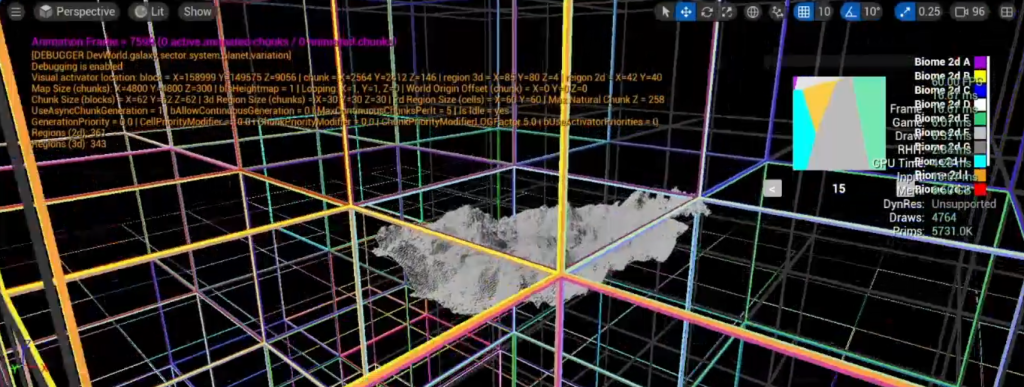
Remember the chunk regions? I’ve briefly talked about them in previous articles and videos. In my project, all chunks are part of a bigger region (colored cubes in the above image).
Up until now, regions didn’t do much in my game, but we’re about to make them work hard for us! Let me present to you the region points.
Region points
When spawning regions (so before any chunks is generated for this region), I’m generating regions points based on a ‘region size’ (just like how chunks generate blocks based on a ‘chunk size’). Note: for now I will only be talking about 2d regions, because this is where we define our 2d biomes.
These points don’t need much: a position (relative to the region), then whatever attributes you need for your biomes.
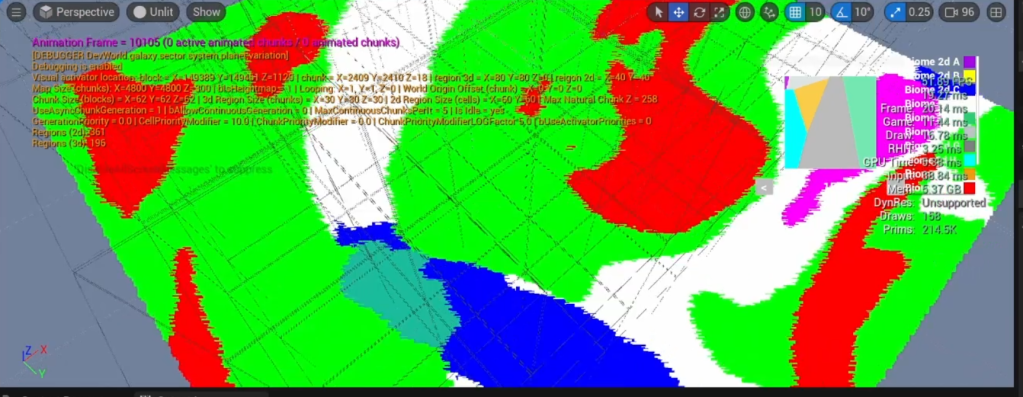
The above shows a bunch of region points, from many regions, colored by their generated biomes (based on very basic elevation, temperature and moisture noises).
This represents a huge part of the world, and still gives use enough definition for each biome. Computing this at the block level would have been way more expensive, for not much gain detail-wise.
Non-uniform grid
Our end goal with these points is to use their baked biome information for the block generation. Spoiler alert: some undersampling is going to happen.
If we stick to a purely grid-like pattern (similar to how blocks are arranged in a perfect grid inside chunks), we run the risk of ending up with very blocky-looking biome transitions. You may have seen those even in very popular blocky games.
So, one step to help with this aspect is simply to jitter the regions points grid. It only costs a random noise during region generation or, if you want to be fancy, some poisson-like distribution.
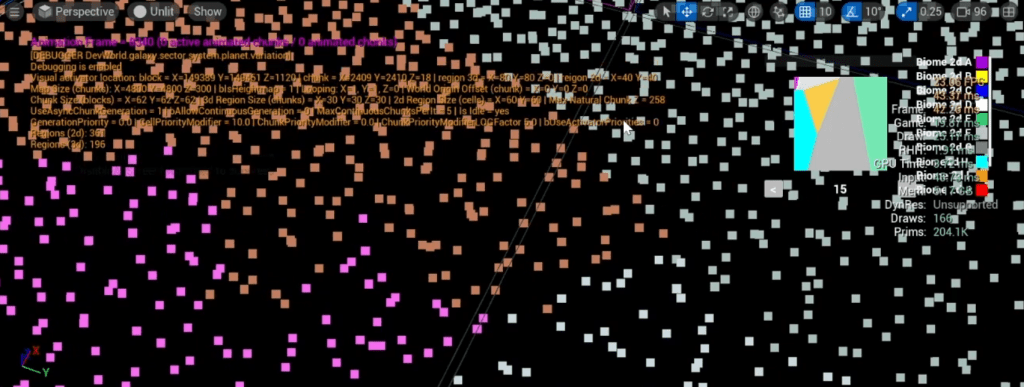
The above hopefully clearly shows the region points aren’t distributed in a perfect grid.
Also, remember that what we’re seeing above is at a gigantic scale. You will still have the opportunity to add more refined warping noises at the block level when sampling the biome values.
Sampling Biomes
Now that we have our data structure with all the biome information we need, it’s time to finally use it on our blocks.
Here, you need to make a decision: do you want to allow multiple biomes to influence the same block?
If no, just find the closest region point to the block you are currently generating. Done. This is your biome.
If yes (what I’ve chosen), you will need to gather all the region points that are ‘in-range’. You decide what is considered in-range. The more region points you sample, the more expensive it gets.
What you should end up with is a list of biomes and their corresponding normalised weight (all weights should add up to 1). The closer a region point, the more weight it has. This excellent article shows you one way you can achieve this. It’s not very complex! I’m using a much simpler approach in my game, but it’s very similar.
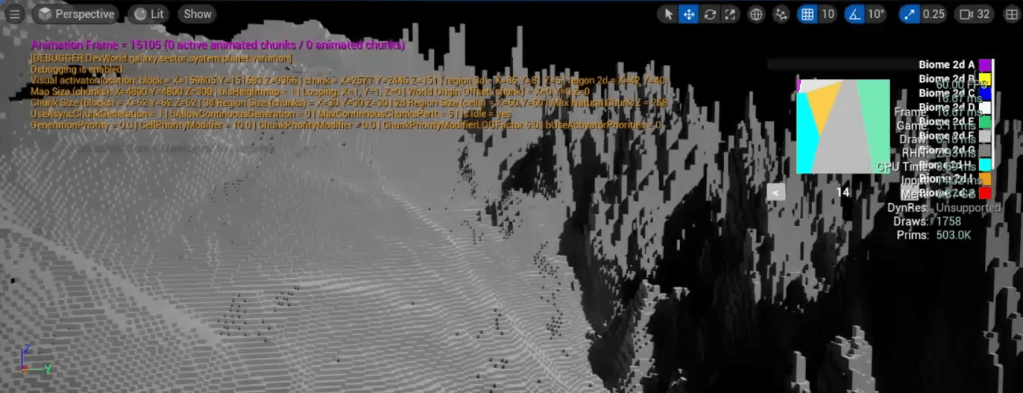
The above is an example of the result. The biome on the right has a crazy high-frequency noise (just for the sake of showing a clear difference with the biome on the left). Notice how the blocks at the transition smoothly blend between the two height values.
The noise on the right is so crazy that this transition might seem a bit harsh still, but with more realistic noises, this will blend nicely. The more region points you sample, the smoother it is (again, at a greater computational cost).
If you implement all of this, you will surely see your chunks block generation slowing down to a crawl. Turns out sampling many region points for each block is painfully slow.
Undersampling this step, even by just one level (computing one block every two blocks, which is dividing the total amount of blocks by 8 in 3d!), will get you back to very reasonable times. Just use trilinear interpolation to bring back your sampled data to the 1:1 block scale. In my case, this biome sampling step went from costing 40 times as much (4000% increase!) without undersampling to barely a 25% increase in generation time with a single level of undersampling (note: these numbers include sampling 3d biomes, which cost more than 2d biomes, see below).
There is probably still room for improvement. I might get back to it later.
By the way, the previous screenshot shows the result with undersampling implemented, so it proves that this isn’t going to alter your biome transition in a bad way whatsoever. It might actually help you avoid blending artifact that would result from too much details on the blocks (issue of floating blocks seen in many voxel-like games).
2d biomes or 3d biomes?
We mostly think about biomes as 2d entities these days. Desert, forest, swamps, etc.
But we’re in a 3d game for *** sake!

Everything I’ve been mentioning about region points, biome sampling, etc also happens for 3d regions. I’m maintaining a second set of biomes, completely different from the 2d biomes.
These ‘3d biomes’ will not influence the heightmap, but they can have an impact on the 3d noises: how cave formations look, which blocks to generate, etc.
I don’t have any visual example to show, but they are just like 2d biomes, except that they are generated in the depths of the map.
Blending between 2d and 3d biomes
When sampling 3d biomes for the block generation, you actually also need to sample the 2d biomes only if the bock height (Z in Unreal) is high enough to be ‘in-range’ of the 2d biomes. What is considered in range is up to you, but the gist of it is that you want the 2d biomes to impact surface-level block generation the most, then smoothly blend to 3d biomes as the blocks get deeper. Past a certain depth, you don’t need to worry about 2d biomes at all anymore.
Do you really need 3d biomes?
Please note that there are some important performance considerations to using 3d biomes. 3d biomes give you the amazing opportunity to greatly enrich the variety of your world in the depths, but it comes at a cost. While 2d biomes should be extremely fast to generate, when switching to 3 dimensions, generation can slow down quite a bit.
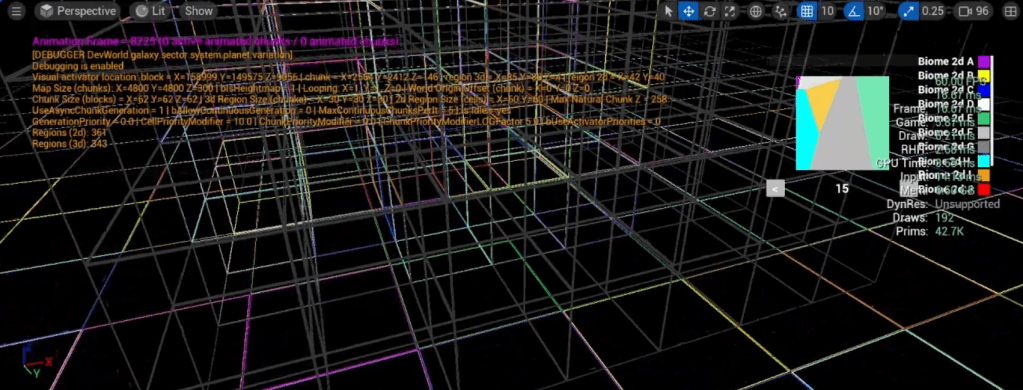
In my project, not only 3d regions are smaller than 2d ones, but they also have less region points per axis (they still have way more region points in total than 2d regions, but they are less dense overall).
Biome entities
So far I’ve only talked about generating biomes, but I didn’t expand on what biomes really are in my project.
I briefly stated at the beginning of this article how I want biomes to feel like their own unique entity, for example by giving them unique labels in-game.
To provide more variety and uniqueness, I don’t want all biomes of the same type to look like each other. For example, I don’t want all ‘pine-tree forest’ biomes to look alike. I want to add some variations to them.
What’s actually happening is that the biomes looked up by the region points are just biome ‘archetypes’ (or recipes). Once the region generation is done (before any chunk generation happens), actual ‘instances’ of these biomes are spawned, one for each unique, contiguous set of region points sharing the same archetype.
You end up with what I called region sets.
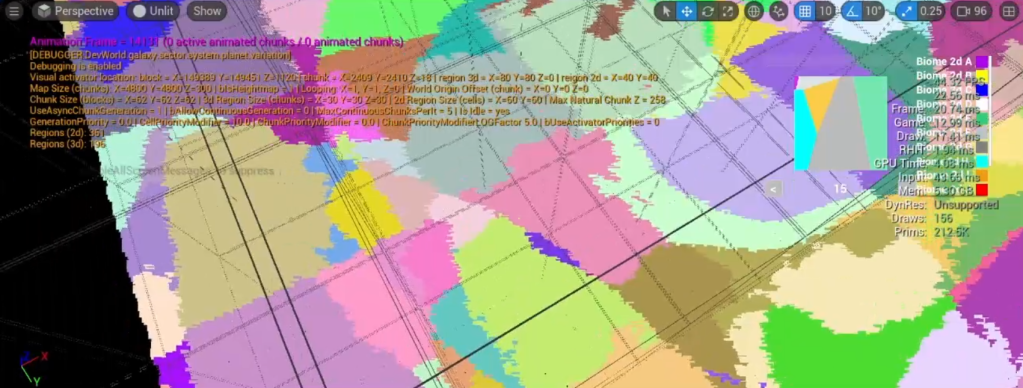
The above is the same image as the one at the top of this article. It shows the various region sets, with random colors. Each of these sets spawned a unique instance of their biome archetype.
After these biomes have been spawned, they can potentially evolve, and derive from their archetype. One obvious example is the block types they generate: the archetype may provide a list of potential ‘flower’ blocks to spawn on the ground. The instance A of this archetype might favor some flowers while another instance B might have picked a different set of flowers among this list.
In the code, my biomes all inherit from the same class, and they have (among many other things) 2 variables in common: the ‘centroid location’ and a ‘seed’ value.
Both of those are unique to the biome instance and can be used as a starting point for these procedural decisions (which label to give the biome, which ‘flowers’ to use in this forest, etc).
This sounds great, and it is very powerful. But there is something very important we need to keep in mind here: consistency in generation.
Ensuring consistent generation
As with everything related to generation in a game like this, and especially if you’re hoping to make it work in multiplayer, you have to rely on consistent generation to make the world as lightweight on the disk (and the network!) as possible.
I just mentioned that the biomes get attributed a ‘location’ and ‘seed’ at spawn, which are then used to drive all pseudo-random generation and tweaks specific to this biome instance. Here, the key is that this location and seed must be consistently generated.
With all the information given in this article so far, this should not be an issue. Everything we’ve done can be consistently generated. But there is something I haven’t mentioned yet…
Fixing region border biomes
We’re working with regions. Regions are squares (2d regions) or cubes (3d regions). If you apply everything we’ve learned, you will end up with biomes spawned per region, independently, and they will abruptly stop at the region borders.
In-game, this will make many biomes appear to be stopping with very long, unnatural straight lines. Not good.
Here is an image you already saw:
Each color represents a biome. Obviously, biomes can span many different regions. It is impossible to recursively generate regions until you reach the end of a biome. For all you know, the biome could spread across the whole map.
The solution I’ve found is far from perfect, but it helps. To avoid these straight lines at the region borders, I look up the adjacent regions points and ‘spread’ the region sets (biomes) using some simple noises and distance checks.
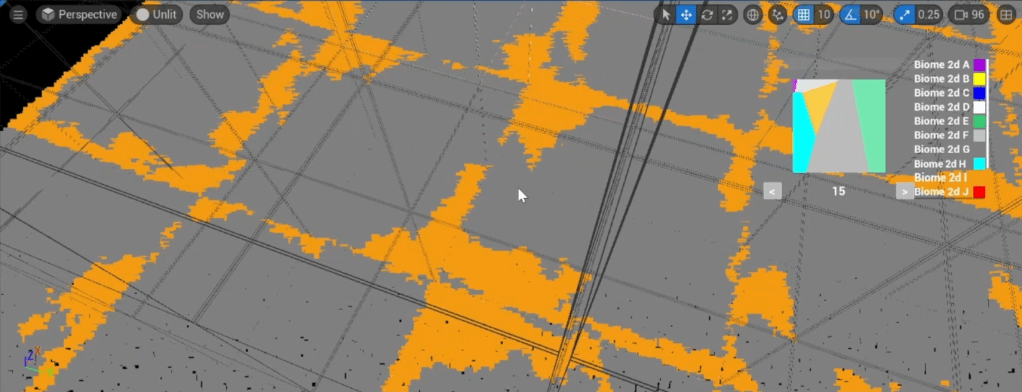
When checking adjacent region points (for each axis), I detect those sharing the same biome archetype. Then, for each of these pairs of matching archetype, each region point finds which region set ‘centroid’ is the closest, and attach itself to it.
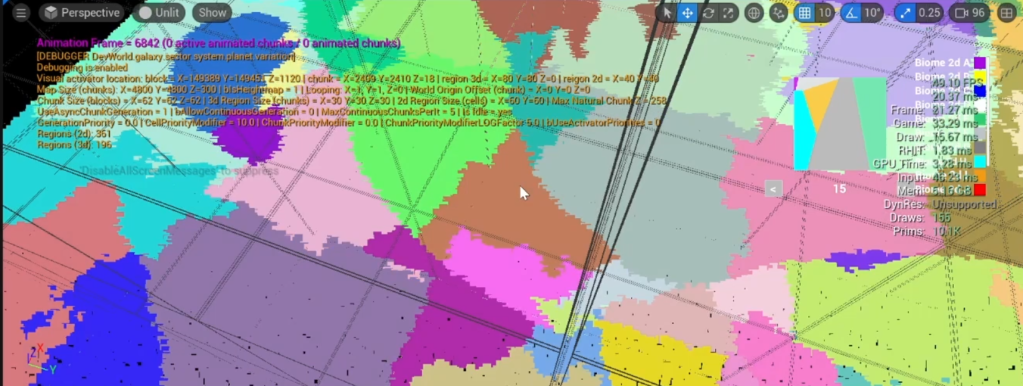
In the actual code, because each region must be completely independant, what’s actually happening is that these ‘attached’ points create a perfect copy of the biome from the other region that they are supposed to get attached to. Because biomes rely on their seed value for all things related to generation, this ensures that these ‘duplicate’ biomes will look identical. The duplicates still keep track of their ‘parent’ biome anyway, just in case it’s needed.
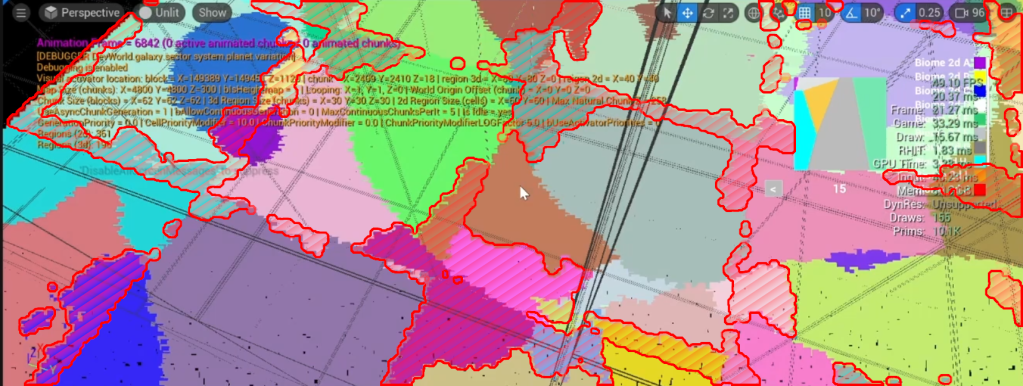
This does mean that each region needs to wait for all its adjacent regions to get generated before they can ‘merge’ their region sets with them. A region cannot be considered ‘ready’ until this merging step has happened. This is fine, but it’s something to keep in mind.
Another limitation is that actual biome instances are limited in the area they can cover. They will never spread across more than 3 regions in each axis, and they will realistically only cover the equivalent of one region. Look at the previous picture again to understand why: the main region set of the biome is in the ‘current’ region, and it can only spread a little to adjacent regions (just enough to ‘blur the lines’).
Why do we need to do that?
In case this isn’t clear, the whole reason we need to keep regions and their biomes independant from other regions is mostly related to multiplayer.
It’s still an ‘issue’ in single player, because without it, the same map could be different if the player approaches the regions from different sides. For multiplayer, it is absolutely critical, unless you want to have to make each regions and biomes replicated actors / components (if it sounds painful, it’s because it is).
Again, keep in mind that all biomes ‘parameters’ are pseudo-randomly generated. These pseudo-random ‘noises’ need some consistent input (seed). This plus the fact the biomes can spread across multiple regions run the very high risk of having different seed generated for the same biome, depending on the order in which the regions have been generated.
If a player approaches a region from one side and a biome spreading across 2 regions is generated, the game will base the pseudo-random number of this first ‘half’ of the biome. This is ‘seed A’.
Now, for the same map, if instead the player approaches the map from the other side, it generates the other ‘half’ of the biome first, producing a different ‘seed B’.
And here you have your inconsistent generation. This is why having regions wait for their immediate neighbouring regions to also get generated, then making sure adjacent biomes are ‘linked’ together fixes this particular issue.
It has its downsides (discussed above), but it is all reproductible locally by the client, without any replication or input needed from the server.
Conclusion
Biome sampling isn’t free. If you apply the optimisations given above, you should be able to reach good enough speed for very rich-looking map generation.
Besides, having each biome be a persistent entity, aware of itself and linked to the world, unlocks many cool features that would be hard to implement if you used a ‘generate once and forget’ approach. One very interesting thing I’d like to do is having the biome class respond to ‘time of the year’ changes. As time passes and seasons change, you could for example have all trees in your biome slowly lose their leaves, change color, etc. Very cool stuff like that!
Having each biome baked into persistent information (region points in my case) is very useful anyway and allows for a very flexible approach to procedural generation.
However, region points can have other uses! Indeed, why just limit yourself to biomes? Region points are an extra, coarse grid of data you can use in your game (compared to chunks and blocks).
Next time, we’ll be talking about pre-generation and macro-level entities. And, you guessed it, region points have a role to play there…

Leave a Reply